DOM clobbering 1Password to fix syntax highlighting
TLDR; Add this to your site if 1Password’s browser extension is breaking syntax highlighting:
<a hidden id="Prism"></a><a hidden id="Prism" name="manual"></a>
Skip to the breakdown, or read on.
Backstory
About two weeks ago, I noticed that this blog’s code syntax highlighting stopped working. This blog (tautology.town) uses Jekyll, which comes with Rouge syntax highlighting out of the box.
Eventually, I discovered that 1Password’s browser extension was inadvertently overriding syntax highlighting in all websites (bug report). In a recent update, 1Password added Prism.js as part of an experimental snippets feature.
Prism.js highlights everything by default, so bundling it into the content script without Prism.manual = true means it runs on any .language-* class code block on every website.
The immediate fix for 1Password is simple: Prism.manual = true and manually invoke Prism.
More importantly, Prism.js should not be in the content script at all. The feature is restricted to the 1Password vault, so Prism should be moved to the extension’s popup script. It seems like a major oversight for this to have been included.
Worst of all, it appears to be a useless dependency. I couldn’t find the snippet feature in the browser extension. The desktop app has snippets but doesn’t highlight code.
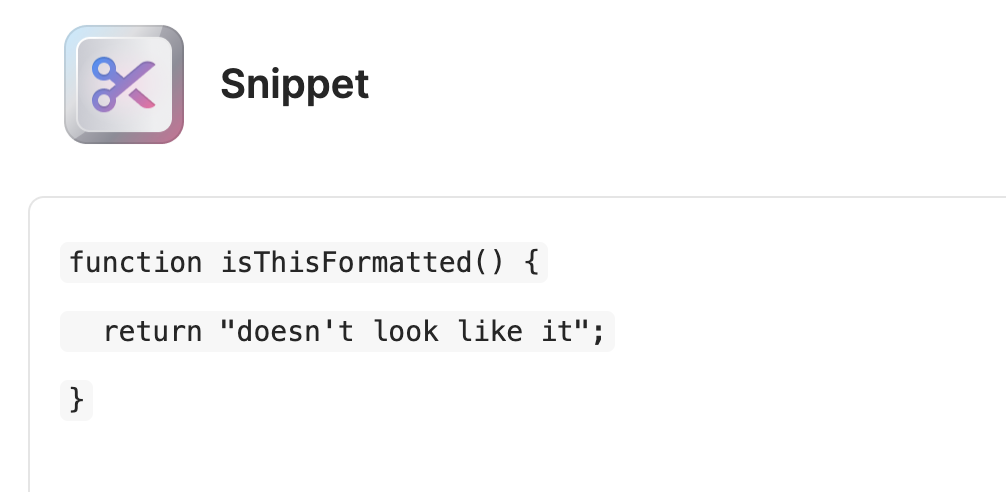
I believe Prism.js is only included as a dependency of @lexical/code, part of the editor used for snippets. If so, Prism.js could be omitted entirely.
I assumed this would be fixed quickly.
Some time later…
Two weeks later, the issue was still not fixed and managed to pick up quite a bit of attention online (2.6k likes):
youyuxi: .@1Password browser extension is injecting Prism.js globally on every page, which then applies its syntax highlighting logic on all <code> blocks matching [lang=*] regardless of whether it’s meant to be compatible, thus breaking original highlighting.
Terrible negligence and even more so that this made to prod while already flagged during beta.
Been a user for a long time but this will def push me to an alternative if not fixed soon.
Evan You (@youyuxi) is the creator of Vue and Vite.
I think this was the push for 1Password to act. They are finally deploying a fix and promise a postmortem.
At the time of writing, the fix is not yet live for me. I see an update in the Chrome store, but not in Firefox or Safari (both iOS and MacOS).
While we wait, we can take matters into our own hands.
DOM clobbering
Web extension content scripts get access to the DOM (to do stuff) but run in an isolated Javascript context to prevent web content from accessing or overriding their behavior. Without this, they could be vulnerable to something like prototype pollution.
However, scripts with DOM access are still susceptible to DOM clobbering. DOM clobbering is using the DOM to define/redefine things expected by the running Javascript.
The HTML standard allows for “named property access” on window (docs) and document (docs), which means HTML DOM elements with id or name set can be accessed as if they were Javascript properties. For window:
For each <embed>, <form>, <iframe>, <img>, and <object> element, its name (if non-empty) is exposed. For example, if the document contains <form name=”my_form”>, then window[“my_form”] (and its equivalent window.my_form) returns a reference to that element.
For each HTML element, its id (if non-empty) is exposed.
If a property corresponds to a single element, that element is directly returned. If the property corresponds to multiple elements, then an HTMLCollection is returned containing all of them. If any of the elements is a navigable <iframe> or <object>, then the contentWindow of first such iframe is returned instead.
Recall that properties of window are implicitly global, so in the example my_form also returns the form.
Even DOM APIs like document.addEventListener can be overridden in this way.
<form name="addEventListener"></form>
<script>
console.log(document.addEventListener)
/* prints <form name="addEventListener"></form> */
</script>
There are some limitations to this attack:
- It only works if the corresponding value is not already defined by the Javascript context.
- You can only return an HTML element or an
HTMLCollection, not arbitrary values.
Still, you can take advantage of things like:
HTMLCollectionaccess by id/name to DOM clobber nested properties.- HTML elements are truthy, so you can override false values.
<a>tagstoString()gives thehrefvalue, and can be coerced with concatenation.- Convenient property access that matches HTML elements: e.g. if
valueis accessed you can clobber with an<input value="overridden-value">
We can use the first two tricks to clobber 1Password’s Prism.js.
Clobbering Prism.js
The Prism.js docs show how to normally disable automatic highlighting:
<script>
window.Prism = window.Prism || {};
window.Prism.manual = true;
</script>
Since 1Password’s content script is in an isolated context, including this script on a site won’t affect the content script. Its Prism.js won’t ever see window.Prism.manual = true.
Let’s look at the Prism.js source to see how this setting is evaluated. On line 51 of prism-core.js:
manual: _self.Prism && _self.Prism.manual,
It’s checked on line 1184 before auto-highlighting:
if (!_.manual) {
And _self is set on line 3:
var _self = (typeof window !== 'undefined')
	? window   // if in browser
	: (
		(typeof WorkerGlobalScope !== 'undefined' && self instanceof WorkerGlobalScope)
			? self // if in worker
			: {}   // if in node js
	);
So, manual is set to window.Prism.manual and can be DOM clobbered!
Payload
Let’s craft our payload and put it in our HTML:
<a hidden id="Prism"></a><a hidden id="Prism" name="manual"></a>
Breakdown
- There are two
<a>tags with matchingid=Prism, sowindow.Prismwill return aHTMLCollectionwith both. - An HTMLCollection’s elements can be accessed by their
idandname, so we give the second tagname="manual"to makemanuala property of the collection that returns the second<a>. - Finally, an HTML element is truthy, so
!window.Prism.manualreturnsfalse, stopping automatic highlighting. - Also, we add
hiddenso they aren’t displayed anywhere + ignored by screen readers.
We can check in the console:
> window.Prism
HTMLCollection(2) [a#Prism, a#Prism, Prism: a#Prism, manual: a#Prism]

> window.Prism.manual
<a hidden id="Prism" name="manual"></a>

> !window.Prism.manual
false
And it works! This is the fix currently deployed to this site, if you need further proof it works.
Security implications
1Password, the app
You may be (rightfully) concerned about other ways 1Password could be DOM clobbered via Prism.js.
In fact, I learned about DOM clobbering when looking into the security of Prism.js.
CVE-2024-53382 describes an XSS on Prism.js 1.29.0 using DOM clobbering. The original report gives a great summary of the vulnerability. At a high level, Prism’s autoloader plugin uses document.currentScript to dynamically load language definitions that an attacker could clobber to load their own script. It was patched in 1.30 by checking if document.currentScript.tagName equals 'SCRIPT'.
Thankfully, as far as I could tell, the version deployed by 1Password is not vulnerable to XSS via Prism. The manual parameter is designed to be overridden, which inadvertently allows for DOM clobbering. Other things on Prism don’t appear to be clobberable.
I did discover XSS vulnerabilities in v2 of Prism.js and will submit a fix or issue. That version has been in development since 2022 and is the default branch on GitHub, but isn’t yet released.
1Password, the company
The bigger question is what this signals about 1Password, the company.
I’ve historically trusted 1Password over other password managers due to their secret key based security model (especially over LastPass, which is not safe at all). 1Password has a good reputation from publishing about security and their approach.
This incident has me second guessing. It shouldn’t have been addressed so slowly (2+ weeks), nor should it have passed code review. Adding stuff to the content script is a big deal for extension development.
It appears to stem from improper bundling in the shared Javascript between the Electron desktop app and the browser extension. Moving from native to Electron already seemed like a cost-saving measure.
Security is largely a function of organizational culture. I worry they’re prioritizing business and growth over product and security.
Let’s hope I’m wrong. We’ll find out more if/when they publish the postmortem.
Trust is hard to gain, easy to lose, and harder still to get back.
Resources
- I like this writeup of DOM clobbering best: Beyond XSS: Can HTML affect JavaScript? Introduction to DOM clobbering
- A useful table of common patterns: DOM Clobbering Wiki: Patterns and Guidelines
- Another developer’s very similar experience: 1Password Dependency Breaks Syntax Highlighting
You might also find interesting the WHATWG specs for named properties: